Updating the Firmware of your New ROVE DashcamUpdated 5 months ago
How to update the Firmware.
You can update your camera's firmware over the air (OTA) using the Rove app.
Below are the steps to update the firmware of your ROVE Dashcam.
First, download or update the Rove app using the links below.
For ANDROID: https://play.google.com/store/apps/details?id=com.rovedashcam.android
For iOS: https://apps.apple.com/us/app/rove-dash-cam/id1606959035
Once the app is installed, sign up or register for a new account if you haven't had one yet using an internet connection or cellular data. If you already have, please sign in.
When prompted by the app, kindly ALLOW ALL PERMISSIONS and turn off the phone's Mobile Cellular data, Wi-Fi calling, and VPN/anti-virus software if you have any.
Check if the dashcam's Wi-Fi is enabled. The Wifi automatically turns ON together with the dashcam and a voice prompt will let you know that the Wifi is turned ON. (If not sure, you can turn ON the WIFI via the System Settings)
Next, Go to your Phone’s Settings > WiFi> look for ROVE WiFi and connect. Disable the auto-connect function of other Wi-Fi networks around as our mobile phones prioritize connecting to a network with internet connectivity that the camera doesn't have.

Once connected to the dashcam's Wi-Fi, you will be prompted to "Add New Device." Kindly proceed and add the serial number of your ROVE dashcam on the ROVE app. You can also do this manually by clicking the three lines on the upper left side of the app page and selecting switch camera on the sliding menu page.
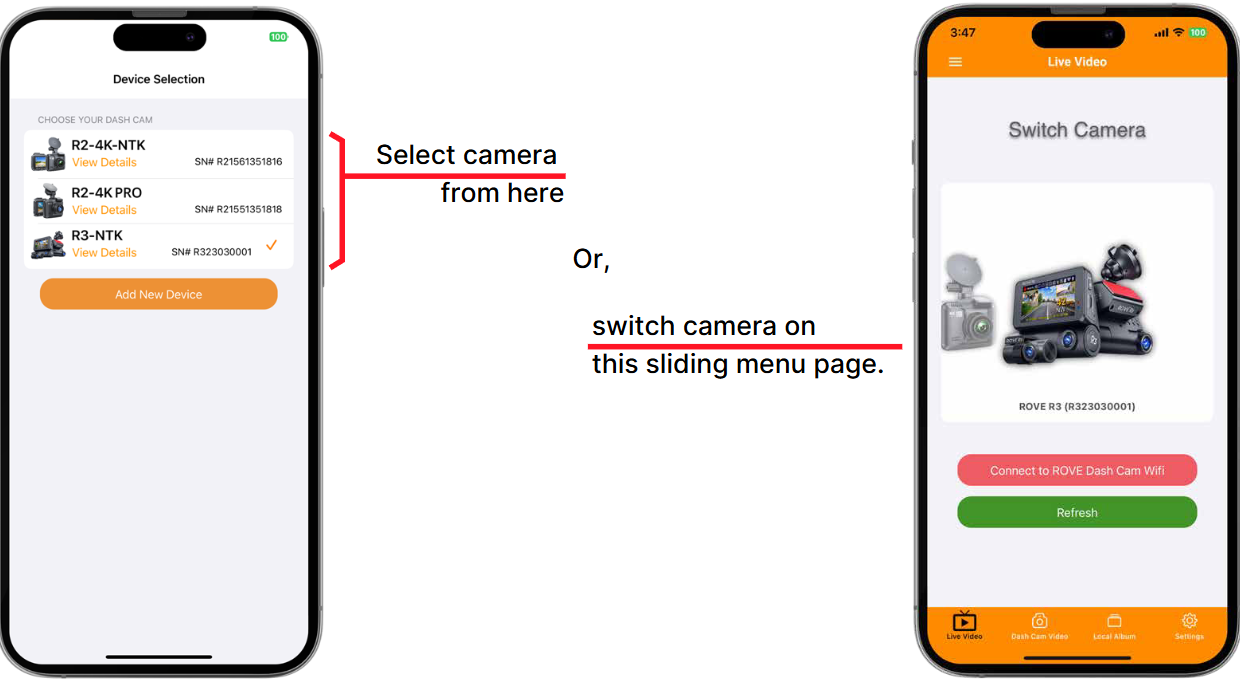
If your ROVE Dashcam is already selected, a pop-up message will prompt you to update your firmware to the latest version. You can select the option to proceed with updating your Rove dashcam.
You can also manually do this by tapping the three lines on the upper left side of the ROVE app and selecting "Switch Camera." If your dashcam needs a firmware update, the option will then be available.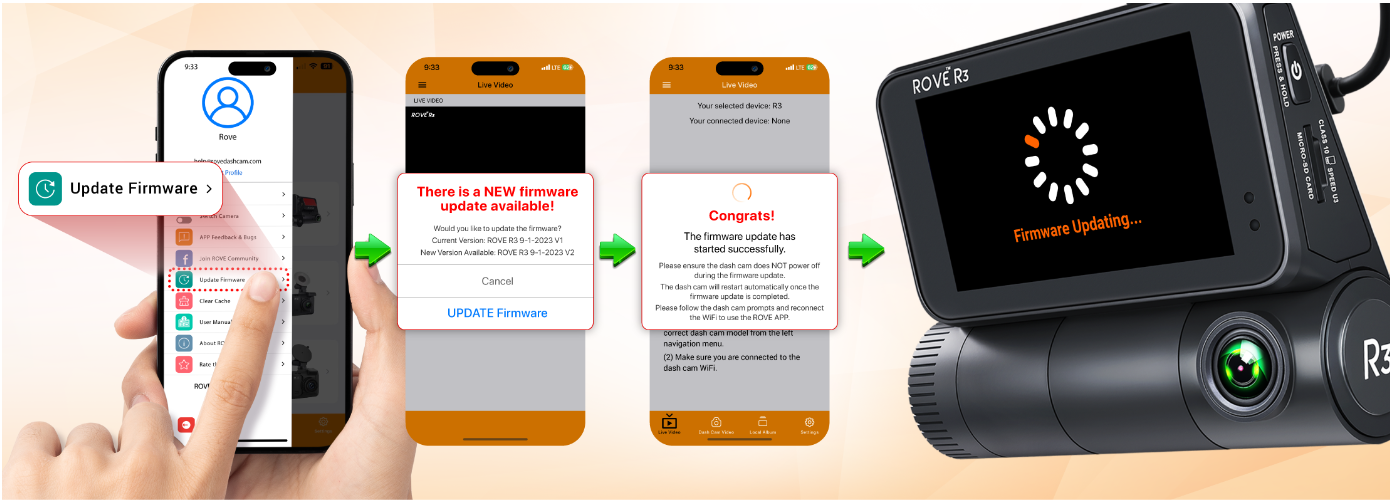

After the firmware update process, please check and confirm if the firmware on the dashcam shows the updated firmware version.
Important note: The above steps are only applicable to the Rove dashcam model OTA capable (NEW R2-4K, R2-4K PRO, R2-4K DUAL, R2-4K DUAL PRO, and R3). If your R2-4K is the 1st gen version (e.g., SN starts with R21), you can check the firmware update by providing details via the link below:
https://www.rovedashcam.com/pages/firmware_update_page
Please feel free to contact us if you have any questions or concerns.
CUSTOMER SERVICE:

Email Us: 📩[email protected]
Text Us: 📲1-844-768-3226 (For faster response)