How do I know if the R2-4K DUAL rear camera is working?Updated 8 months ago
To make sure your ROVE R2-4K DUAL dash cam’s rear camera is functioning properly, follow these simple steps:
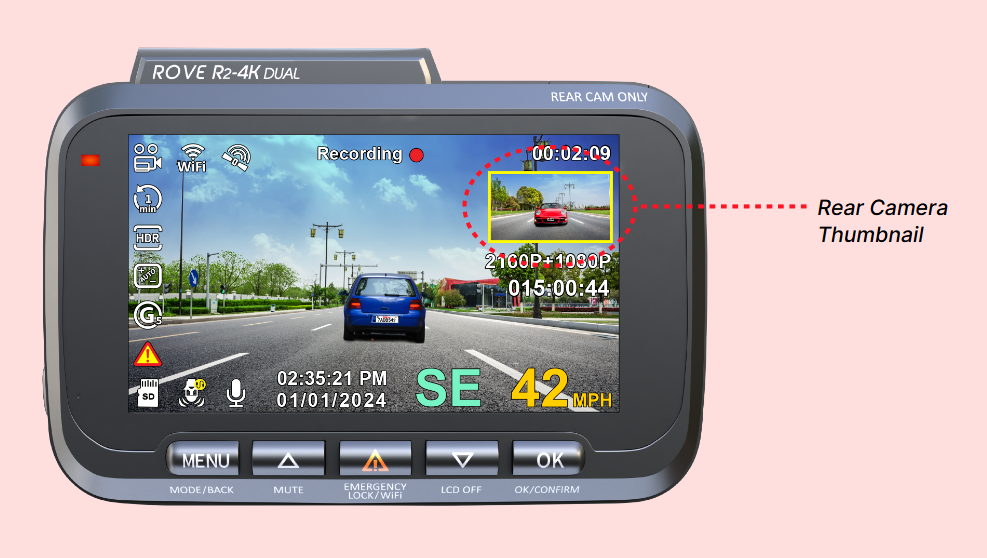
1. Check the Rear Camera Thumbnail on the Screen
When your dash cam is powered on, look for a small thumbnail display of the rear camera feed on the main screen. If you can see the live rear view in this thumbnail, it confirms that the rear camera is connected and operating correctly.
2. Review the Recorded Footage
When your dash cam is powered on, look for a small thumbnail display of the rear camera feed on the main screen. If you can see the live rear view in this thumbnail, it confirms that the rear camera is connected and operating correctly.
By regularly verifying these two points, you can be confident that your rear camera is working as expected and providing reliable coverage.
Related Article: https://www.rovedashcam.com/pages/faq?hcUrl=%2Fen-US%2Fhow-do-i-change-my-screen-display-view-1841998
We hope this helps. Please don't hesitate to contact our customer support team for further assistance. Our dedicated support team is available to help troubleshoot any issues you may encounter and provide personalized assistance to ensure your ROVE dash cam operates smoothly.
CUSTOMER SERVICE:

Email Us: 📩[email protected]
Text Us: 📲1-844-768-3226 (For faster response)